
How do I calculate payroll, review deductions, and export for Gusto/ADP?
Run payroll calculations from approved hours, verify overtime and tax withholdings, and generate standardized CSV files for external payroll processors.
In YourMedSoft, to calculate payroll, review deductions, and export for Gusto/ADP requires navigating to Payroll & Deductions in the portal, selecting the appropriate record or facility, and executing the validated workflow steps. The platform continuously validates clinical credentials, checks compliance matrices, and logs all actions to an immutable audit trail.
What You Need Before Starting
- Approved timesheets for the target pay period.
- Staff pay rates configured on worker profiles or Foundation pay rules.
Clinical & Regulatory Compliance Standards
- Conforms to The Joint Commission (HCSS) clinical staffing standards.
- Maintains HIPAA-compliant data encryption and audit logging.
- Enforces state Board of Nursing licensure and clinical scope-of-practice rules.
Step-by-Step Instructions
Open Payroll Module
Click "Payroll" in the left sidebar navigation.
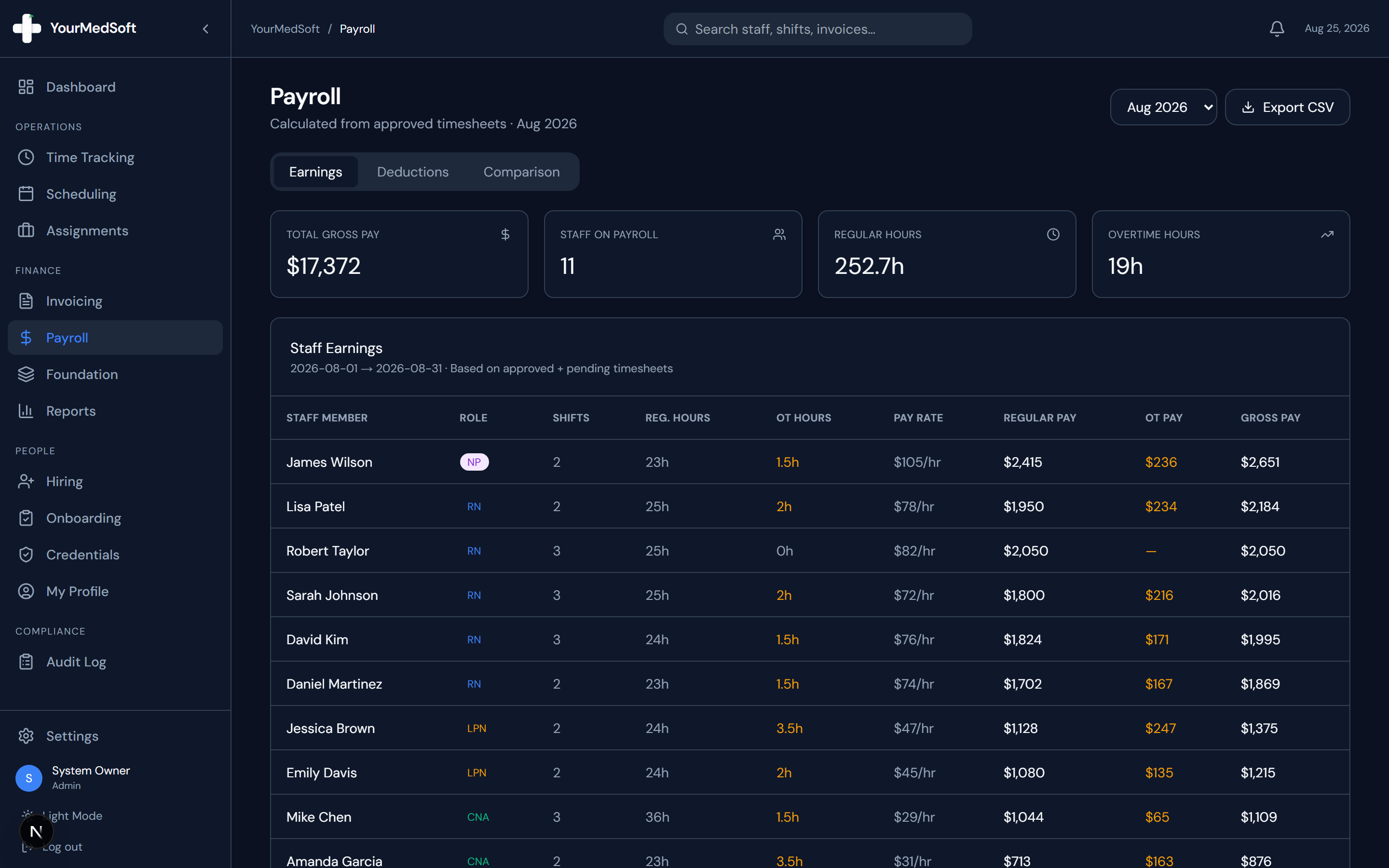
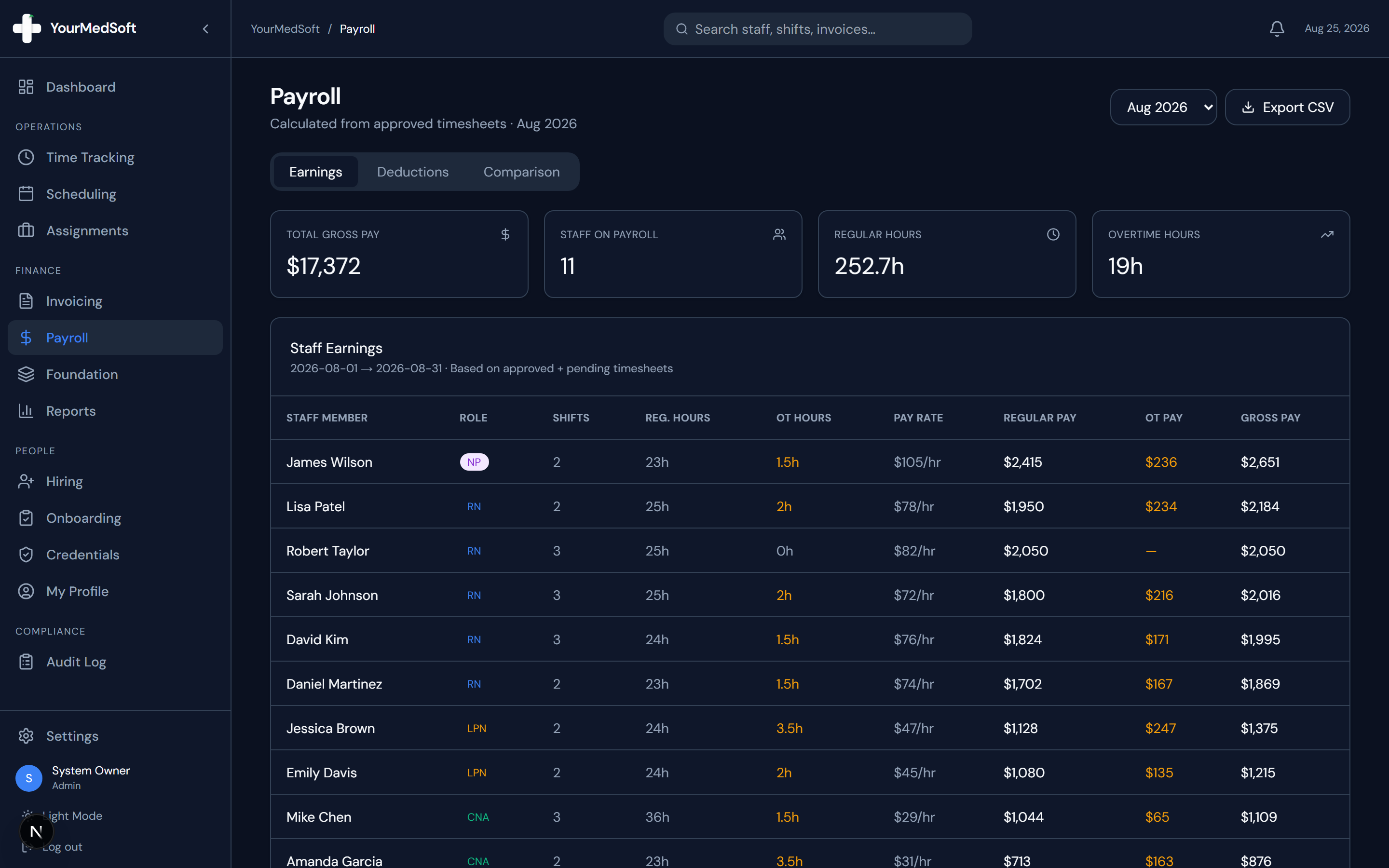
Staff payroll earnings calculator with hourly pay rates, overtime gross pay, and export action.
Select Pay Period
Use the period selector dropdown in the top header to choose your active payroll cycle (Monthly, Bi-weekly, or Weekly).
Automate Your Healthcare Staffing Operations
YourMedSoft unifies scheduling, GPS time tracking, credentialing, and facility invoicing into one modern platform for healthcare agencies.
Review Staff Earnings Breakdown
The "Staff Earnings" tab displays each clinician with their total shifts, regular hours, overtime hours, hourly pay rate, regular pay, OT pay, and calculated gross pay.
Review Tax Deductions & Withholdings
Switch to the "Deductions" tab to review estimated withholding breakdowns for Federal Tax, State Tax, Social Security (6.2%), Medicare (1.45%), and Net Pay.
Export Standard CSV for Payroll Processor
Click the "Export CSV" button in the header. YourMedSoft generates a formatted CSV containing clinician first names, last names, regular hours, OT hours, pay rates, and locations ready for instant upload into Gusto, ADP, or QuickBooks Payroll.
Pro-Tips & Best Practices
- Overtime pay is calculated automatically using each clinician’s individual OT multiplier (default 1.5x) for hours worked beyond 8 hours per shift.
- Use the "Comparison" tab to compare total gross payroll expenses and clinician counts across the last 4 months.
Troubleshooting & Operational Edge Cases
Issue: Assignment or Action Blocked
Operational Resolution: Verify that all prerequisites and credential requirements are satisfied before requesting an Admin override.
Issue: Notification or Alert Delay
Operational Resolution: Check the clinician profile contact details to ensure SMS and email alert preferences are enabled.
Frequently Asked Questions & Troubleshooting
How do I change the default tax withholding rate?
Agency admins can adjust the effective tax rate in Settings > Payroll to match your state and local tax regulations.
Was this guide helpful?
Your feedback helps us continuously improve our documentation.
Recommended for Payroll & Deductions
Nurse Meal Break Waiver & Attestation Form
Ensure compliance with state labor laws and prevent unbudgeted meal penalty hours.
Gross Margin & Spread Modeler
Calculate exact employer statutory taxes, FICA, FUTA, SUTA, and workers comp burden.
Per Diem Nurse Registry Platform
Automate shift differentials, overtime calculations, and CSV exports for payroll engines.