
How do I filter and navigate the scheduling calendar?
Use multi-criteria filters, switch between weekly periods, and use the mobile touch swipe view for fast schedule audits.
In YourMedSoft, to filter and navigate the scheduling calendar requires navigating to Shift Scheduling in the portal, selecting the appropriate record or facility, and executing the validated workflow steps. The platform continuously validates clinical credentials, checks compliance matrices, and logs all actions to an immutable audit trail.
Clinical & Regulatory Compliance Standards
- Conforms to The Joint Commission (HCSS) clinical staffing standards.
- Maintains HIPAA-compliant data encryption and audit logging.
- Enforces state Board of Nursing licensure and clinical scope-of-practice rules.
Step-by-Step Instructions
Navigate Between Weeks
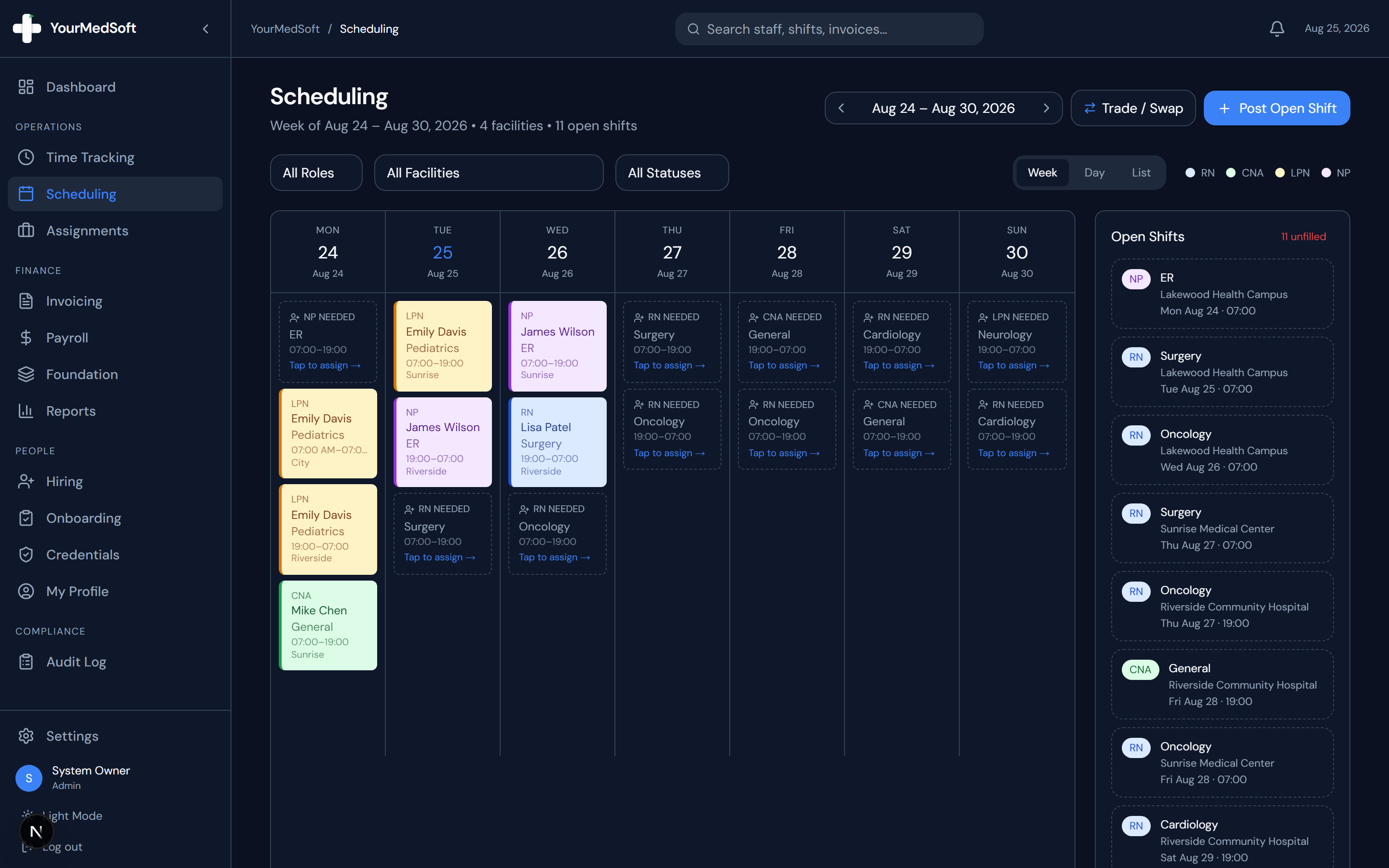
Use the left and right arrows in the top header to jump forward or backward week by week. The current date range is always displayed in the header.
Filter by Clinical Role
Click the "All Roles" dropdown to filter the calendar view to only display specific credentials (e.g., RN only or CNA only).
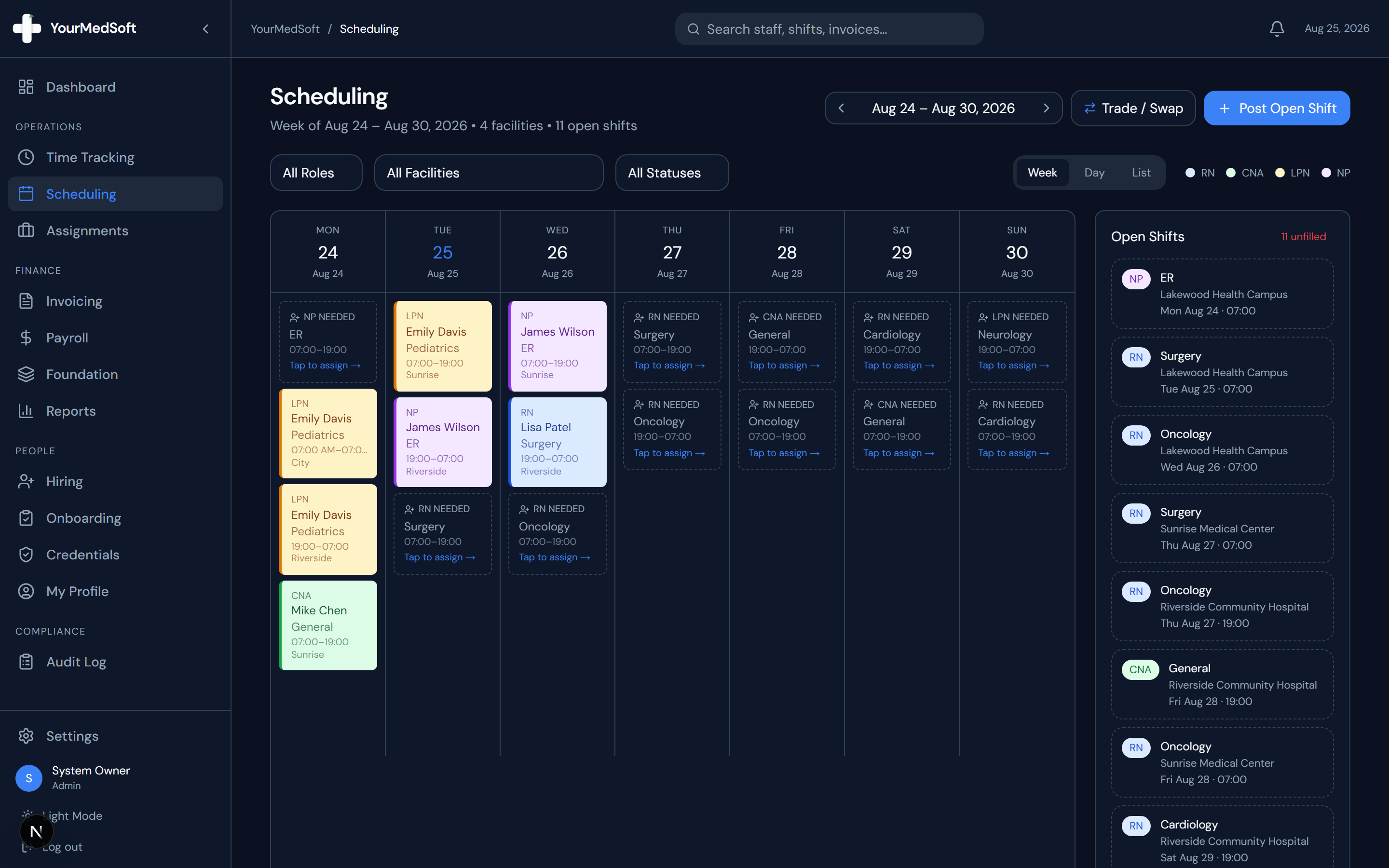
Multi-criteria scheduling toolbar with week navigator, role filters, and facility dropdowns.
Tired of Manual Shift Texts & Phone Trees?
YourMedSoft broadcasts open shifts to hundreds of pre-vetted, compliant nurses in under 60 seconds. Eliminate double-booking and fill vacancies instantly.
Filter by Facility
Select a specific hospital or clinic from the "All Facilities" dropdown to view coverage for a single client location.
Filter by Status
Toggle between "All Statuses", "Open", or "Assigned" to instantly see unfilled holes in your schedule.
Using Mobile Swipe Navigation
On mobile phones and tablets, tap any day pill (Mon–Sun) or swipe left/right across the screen to smoothly browse shifts day by day.
Pro-Tips & Best Practices
- A blue pill indicator highlights today’s date so you can always re-orient yourself in one glance.
- Shifts with scheduling conflicts display a red warning outline around the card.
Troubleshooting & Operational Edge Cases
Issue: Assignment or Action Blocked
Operational Resolution: Verify that all prerequisites and credential requirements are satisfied before requesting an Admin override.
Issue: Notification or Alert Delay
Operational Resolution: Check the clinician profile contact details to ensure SMS and email alert preferences are enabled.
Frequently Asked Questions & Troubleshooting
Can facility clients view schedules for other hospitals?
No. Facility Client user accounts are restricted by security rules to only view shifts attached to their own specific facility.
Was this guide helpful?
Your feedback helps us continuously improve our documentation.
Recommended for Shift Scheduling
Travel Nurse Assignment Contract Template
Free 13-week assignment agreement with guaranteed hours clauses and hospital floating policies.
Gross Margin & Spread Modeler
Simulate clinician bill-to-pay spreads, overtime multipliers, and statutory employer payroll burden.
Per Diem Nurse Registry Platform
Broadcast open shifts, eliminate callout delays, and enforce automated credential gates.